 ThreadKeep
How to organize ChatGPT chats into folders
ChatGPT does not have ordinary folders. The built-in way to group chats is Projects. This guide shows how to use Projects and search, then where a folder extension like ThreadKeep adds something.
Group your chats with Projects
- Find the chat. Open chatgpt.com and locate the chat in the left sidebar.
- Create a project. In the sidebar choose New project and name it after the topic, such as Thesis or Client work.
- Move the chat in. Open the menu next to the chat and choose Move to project, then pick the project. You can also drag the chat onto the project.
- Start new chats inside the project. Chats you begin from within a project are added to it automatically.
- Archive what you are done with. Archive finished chats to clear the sidebar. OpenAI's help center says archived chats still show up in search.
- Search when the sidebar gets long. Use the search button in the sidebar, or Ctrl+K (Cmd+K on Mac), to search chat titles and content.
What Projects do and do not do
A project is more than a folder. It can hold instructions and files that apply to every chat inside it, and it can limit memory to that project. That is useful for ongoing work, but it also means moving an old chat into a project can change how ChatGPT answers in it from then on. Send one test message after moving a chat you rely on.
Projects do not nest, so you cannot put a project inside a project. Some users also report that a moved chat still appears in the Recents list. The file limits for free accounts are small, and OpenAI changes these details often, so check the OpenAI help center for current numbers.
Where ThreadKeep helps
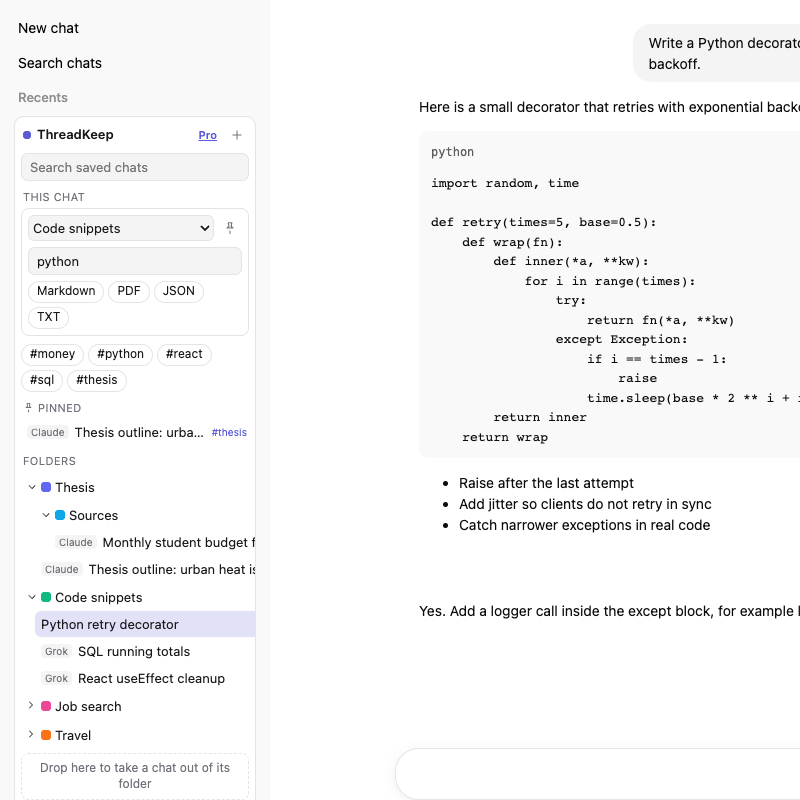
ThreadKeep adds folders to the ChatGPT sidebar without touching how ChatGPT answers, because a folder only stores a title and a link to the chat on your device. You can:
- Nest folders, color them and pin the ones you use most.
- Add tags to find chats across folders.
- Put a ChatGPT chat and a Claude chat in the same folder.
Free covers up to 5 folders, 10 exports a month and unlimited search. Pro is $4.99 a month or $59 once and removes the folder and export limits.
ThreadKeep is not on the Chrome Web Store yet. Add to Chrome (coming soon). Until then, see the ThreadKeep overview.
Which should you use?
If you want instructions and files shared across chats, use Projects. If you want to file chats by topic without changing them, or keep chats from several AI sites in one place, use folders. They work together: a chat inside a project can also sit in a ThreadKeep folder. See the longer ThreadKeep vs ChatGPT Projects comparison.
More guides
- How to export a ChatGPT chat to Markdown, PDF or text
- How to export a Claude chat to Markdown or PDF
- How to export a Gemini chat
- How to search all your ChatGPT conversations
- How to organize your Claude chats
- How to export a Grok chat to Markdown or PDF
- ThreadKeep vs ChatGPT Projects
ThreadKeep adds folders, tags, cross-site search and export to ChatGPT, Claude, Gemini and Grok. Data stays in your browser. No account.
See what ThreadKeep does · Add to Chrome (coming soon)