 ThreadKeep
How to organize your Claude chats
claude.ai groups conversations with Projects. This guide covers moving existing chats into a project, tidying up, and what folders add.
Group Claude chats with Projects
- Create a project. In claude.ai open Projects and create one for the topic. Add instructions or files if you want Claude to use them in every chat in the project.
- Move a chat in. Open the chat's menu and choose the option to add it to a project. Claude's help center says you can also move several chats at once from your chat history page.
- Start new chats from the project. Chats begun inside a project belong to it and can use its knowledge.
- Archive finished projects. Archiving removes a project from the active list without deleting it.
- Find things later. Search past chats on paid plans through Claude's chat search. Searches inside a project stay inside that project.
Things to know
Projects are a workspace, not only a label: project knowledge is available to the chats inside. Context does not carry from one chat to the next unless it is in the project knowledge. There is no nesting of projects, and chat search is limited to paid plans. Plans change, so check Anthropic's help center.
Where ThreadKeep helps
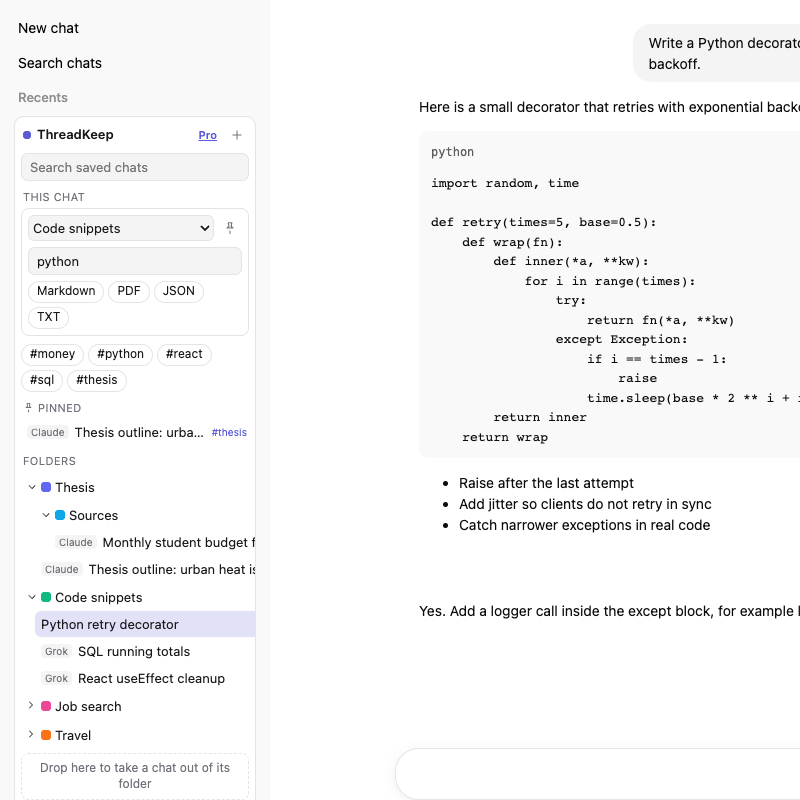
ThreadKeep adds a folder panel to claude.ai. Drag a chat in, nest folders, add tags, color and pin them. A folder only holds a title and a link on your device, so it does not change what Claude sees. Folders can mix chats from Claude, ChatGPT, Gemini and Grok, and search covers the chats you have opened.
Free covers up to 5 folders, 10 exports a month and unlimited search. Pro is $4.99 a month or $59 once and removes the folder and export limits.
ThreadKeep is not on the Chrome Web Store yet. Add to Chrome (coming soon). Until then, see the ThreadKeep overview.
Related guides
Export a Claude chat to Markdown or PDF and organize ChatGPT chats.
More guides
- How to organize ChatGPT chats into folders
- How to export a ChatGPT chat to Markdown, PDF or text
- How to export a Claude chat to Markdown or PDF
- How to export a Gemini chat
- How to search all your ChatGPT conversations
- How to export a Grok chat to Markdown or PDF
- ThreadKeep vs ChatGPT Projects
ThreadKeep adds folders, tags, cross-site search and export to ChatGPT, Claude, Gemini and Grok. Data stays in your browser. No account.
See what ThreadKeep does · Add to Chrome (coming soon)