 ThreadKeep
How to search all your ChatGPT conversations
ChatGPT searches your past chats. If you also use Claude or Gemini, each site searches only itself. Here is how the built-in search works and where it stops.
Search your ChatGPT history
- Open search. On chatgpt.com click the search icon in the left sidebar, or press Ctrl+K (Cmd+K on Mac).
- Type specific words. OpenAI's help center says search uses keywords from chat titles and content, and exact matches work best. Use a distinctive word from the answer, not a description.
- Open the result. Select a result to jump to that chat, then use your browser's find (Ctrl+F) to locate the passage in a long chat.
- Check archived chats. Archived chats still appear in results. Deleted chats are removed from the search index.
Search on the other sites
Claude lets you search past chats on paid plans, according to its help center. Gemini has a chat search page that, going by third-party reports, matches titles more than message text. Grok searches its own history. Each box is separate, so a question you asked on one site cannot be found from another.
Where ThreadKeep helps
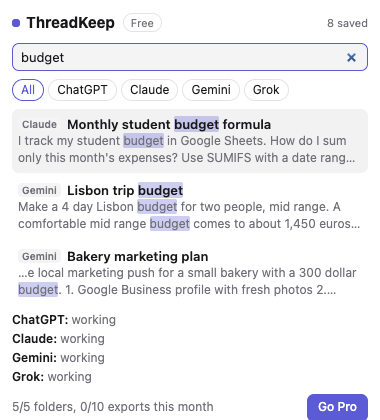
ThreadKeep keeps a copy of the chats you open, in your browser only, and searches them together. Press Ctrl+Shift+K (Cmd+Shift+K on Mac) on ChatGPT, Claude, Gemini or Grok to search titles, answers and code from all four. Results link back to the chat.
One limit to know: it can only search chats it has seen. A chat you opened before installing ThreadKeep is searchable after you open it once with the extension running. Search is unlimited on the Free plan.
ThreadKeep is not on the Chrome Web Store yet. Add to Chrome (coming soon). Until then, see the ThreadKeep overview.
Related guides
Organize ChatGPT chats into folders and export a ChatGPT chat.
More guides
- How to organize ChatGPT chats into folders
- How to export a ChatGPT chat to Markdown, PDF or text
- How to export a Claude chat to Markdown or PDF
- How to export a Gemini chat
- How to organize your Claude chats
- How to export a Grok chat to Markdown or PDF
- ThreadKeep vs ChatGPT Projects
ThreadKeep adds folders, tags, cross-site search and export to ChatGPT, Claude, Gemini and Grok. Data stays in your browser. No account.
See what ThreadKeep does · Add to Chrome (coming soon)